

Apple’s latest update to watchOS, announced at the Apple Event 2024, brings exciting new features that leverage artificial intelligence (AI) to enhance your Apple Watch experience. While many of these features were initially unveiled at the Worldwide Developers Conference (WWDC) in June, the keynote on Monday offered further insights into these advancements. From a powerful translation app to smarter widgets and a new photos watch face, watchOS 11 promises to deliver a more intuitive and personalized experience.

Introduction to watchOS 11
With the release of watchOS 11, Apple is taking the functionality of its Apple Watch to a new level. The update introduces several AI-powered features designed to make your smartwatch smarter and more useful. Whether you’re traveling abroad or just trying to organize your day, these new capabilities aim to enhance your Apple Watch experience.
Translate App: Breaking Language Barriers
One of the standout features in watchOS 11 is the introduction of the Translate app. This app brings AI-driven speech recognition and translation directly to your wrist. Unlike previous versions, the Translate app on watchOS 11 can operate independently of your iPhone, a feature available on the Apple Watch Series 9, Apple Watch Series 10, and Apple Watch Ultra.
You can now download up to 20 language models directly to your watch, making it easy to translate conversations in real-time without needing your phone nearby. This feature is particularly useful for travelers who need quick translations on the go, providing a seamless experience in multiple languages.

Smart Stack: More Intuitive Widget Management
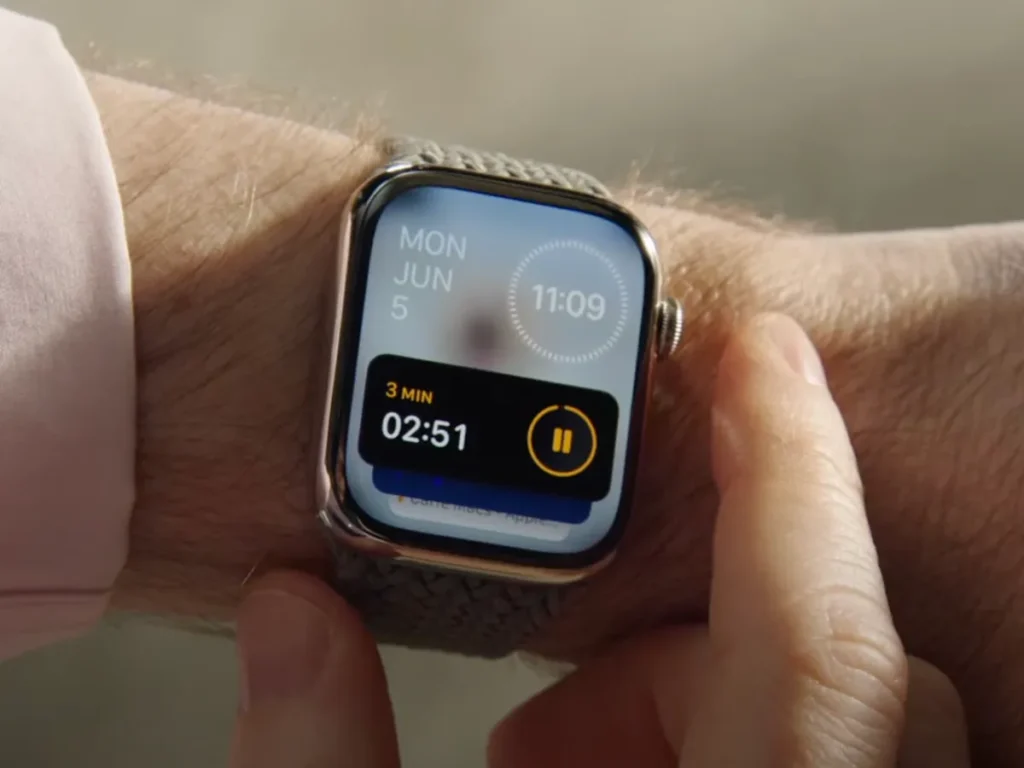
Another significant upgrade in watchOS 11 is the enhancement of the Smart Stack feature. Smart Stack uses AI to provide you with relevant widgets based on your current context, such as the time of day or your location.
With the new update, Smart Stack becomes even more intelligent. It will now automatically add new widgets when you need them, streamlining your access to important information. For example, if you’re at the gym, Smart Stack might show you fitness-related widgets. This added layer of convenience helps you get the information you need without having to manually adjust your watch’s display.
Photos Watch Face: A Personalized Touch
watchOS 11 introduces a new photos watch face that utilizes machine learning to curate and display your favorite photos. This feature uses AI to identify and select images from your library, presenting them in a visually appealing way on your watch face.
You can enjoy a rotating display of your cherished memories right on your wrist, making each glance at your watch a more personal and enjoyable experience. Whether it’s a snapshot from a recent trip or a photo of a loved one, this new watch face brings a touch of your personal life to your daily routine.
Downloading Language Models: What You Need to Know
To fully utilize the new Translate app, you’ll need to download the necessary language models to your Apple Watch. This process is straightforward and can be done directly from the watch itself. The ability to store up to 20 language models ensures that you have a broad range of languages at your fingertips, catering to diverse travel needs and language preferences.
How AI Enhances Smart Stack
Smart Stack’s new capabilities are a testament to how AI can refine user experiences. By automatically adjusting the widgets based on your context, Smart Stack makes it easier to stay organized and informed. This enhancement not only saves you time but also ensures that you’re always presented with the most relevant information.
Personalizing Your Apple Watch Experience
With the updates in watchOS 11, Apple continues to focus on personalizing the user experience. From the translation capabilities to the photos watch face, these features are designed to make your Apple Watch more attuned to your personal needs and preferences. This level of personalization helps in making technology feel more integrated into your daily life.
Embracing the Future with watchOS 11
The new features in watchOS 11 mark a significant step forward in making the Apple Watch a more intelligent and personalized device. With AI-driven enhancements like the Translate app, improved Smart Stack, and the photos watch face, Apple is setting a new standard for smartwatch functionality. As you explore these updates, you’ll find that your Apple Watch becomes even more valuable in helping you navigate your day and connect with the world.
Feel free to dive into watchOS 11 and discover how these innovations can make your daily routine smoother and more enjoyable.