

In today’s digital-first world, handing a device to your child is almost inevitable — but how do you keep them safe while giving them the freedom to explore, learn, and connect? The answer, for millions of families, is Qustodio — a powerful parental control app that offers more than just monitoring. It gives peace of mind.
Let’s dive deep into why Qustodio is quickly becoming the go-to digital parenting tool around the globe, what makes it different, and how real parents are using it to protect their children online.
What Is Qustodio?
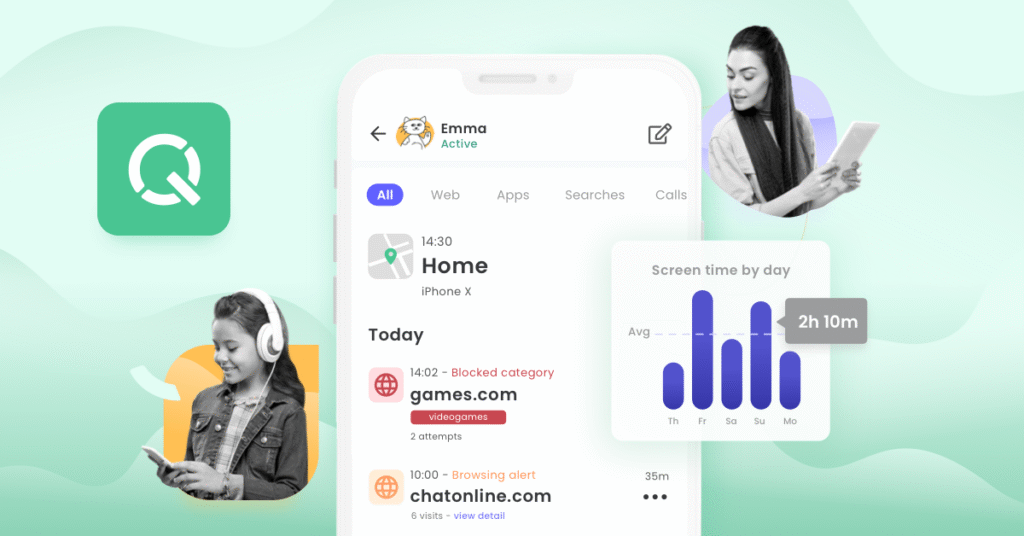
At its core, Qustodio is a comprehensive parental control and digital wellbeing platform. It’s designed to help parents guide, monitor, and protect their children across multiple devices — from smartphones to tablets to desktops.
But unlike some basic monitoring tools that merely track screen time or block a few websites, Qustodio provides a full suite of features built for modern digital parenting.
Top Features That Set Qustodio Apart
Here’s why parents rave about Qustodio:
1. Real-Time Location Tracking & Geofencing
Worried about where your child is after school? Qustodio lets you track your child’s real-time location and even set up “geofences” — virtual boundaries that notify you when your child enters or leaves a specific area. It’s like having a digital safety net for the physical world.
2. Smart Web Filtering
With cyber threats and inappropriate content just a click away, Qustodio’s advanced web filtering engine blocks harmful websites and inappropriate searches — even in incognito mode. Parents can customize filters by category (e.g., adult content, violence, gambling) and create exceptions as needed.
3. App & Game Controls
From TikTok to YouTube, kids are surrounded by apps that demand their attention. Qustodio lets parents see what apps their child is using and for how long. You can block apps entirely or limit usage by setting screen time rules, including per-app limits. It works across Android, iOS, Windows, Mac, and even Chromebooks.
4. Time Management That Actually Works
Struggling to get your child off their phone at bedtime? With Qustodio, you can set daily device schedules that automatically turn off access to certain features after a set time. Say goodbye to nighttime scrolling and hello to healthier sleep routines.
5. Call & SMS Monitoring (Android Only)
On Android, Qustodio goes a step further by showing you your child’s call and text history — even letting you block specific contacts. It’s especially useful for protecting children from cyberbullying and unknown threats.
6. YouTube Monitoring
YouTube is a wonderland of content, both good and bad. Qustodio provides detailed reports on what your child watches on YouTube — even if they’re just browsing without logging in. You’ll know what channels they’re following and what videos they’re drawn to.
A User Experience That Parents Love
One thing parents often praise about Qustodio is how easy it is to set up and use. The dashboard is intuitive and clean, letting you see daily reports, app usage, web history, and screen time from one place. Alerts and notifications help you stay informed without being overwhelmed.
Even more important? Kids generally don’t hate it.
Unlike harsh parental control tools that create conflict, Qustodio is designed to support open conversations about digital safety. Many parents report using it as a tool for education, not punishment — helping children understand healthy tech habits rather than simply blocking them out.
Real-World Testimonials
“We’ve tried a few parental control apps, but Qustodio has been the most reliable and transparent. I can see where my son is, monitor his YouTube habits, and know he’s not stumbling onto harmful websites. It’s worth every penny.”
— Julia, mom of two teens, UK
“As a parent of a child with ADHD, screen time is a big issue. Qustodio helped us set fair boundaries without constant arguments. The app timers have been a game changer.”
— David, dad of a 10-year-old, US
Plans & Pricing: Is It Worth It?

Qustodio offers a free version with limited features — perfect for trying out the basics. But for full access (including app controls, location tracking, and detailed reports), most parents opt for the Premium plans.
There are tiered pricing options depending on how many devices you want to cover. Considering the range of features and the protection it offers, most users find the Premium plan to be incredibly affordable and worthwhile — especially compared to the cost of device repairs, identity theft, or worse.
Final Thoughts: A Must-Have Tool for Digital-Age Parenting
Let’s face it — you can’t be with your kids 24/7, and today’s digital world is packed with risks that didn’t exist just a decade ago. Qustodio empowers parents with the tools they need to protect, guide, and support their children’s online lives without being intrusive or controlling.
Whether you’re parenting a curious 7-year-old exploring the web for the first time or a screen-savvy 15-year-old addicted to TikTok, Qustodio gives you the visibility and control you need — all while building trust and encouraging open conversations.
In a world where digital freedom and safety often seem at odds, Qustodio strikes the balance.
Try Qustodio today and take the guesswork out of digital parenting.